
A Recognition Summary tab has been added to the Recognition Programs area, providing reporting that can be filtered to obtain aggregated insight into the program recognition and counts by fiscal year, calendar year or date range at both the individual and household recognition level. By default, this new tab will be the first tab listed on the window, but each user can click and drag these tabs in whatever order they need.
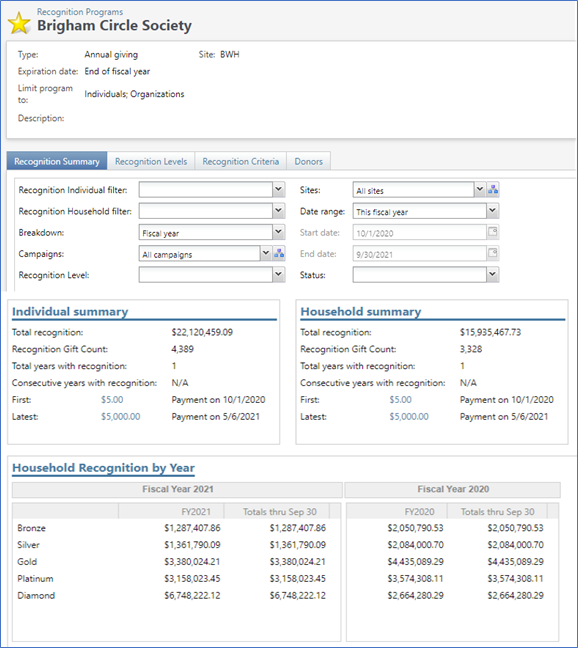
The available filters are
- Recognition Individual filter. Choose All transactions, Cash In or Commitments.
- Recognition Household filter. Choose All transactions, Cash In or Commitments.
- Breakdown. Choose Fiscal Year or Calendar Year.
- Campaigns. Choose All or select one or more campaigns.
- Recognition Level. Choose from the recognition levels for this Recognition Program.
- Sites. Choose All or select one or more sites.
- Date Range. Choose from the standard Atlas date options (this week, last week, this month, last month, etc.)
- Start Date. Becomes enabled if you choose Specific Date Range.
- End Date. Becomes enabled if you choose Specified Date Range.
- Status. Choose Active, Lapsed or All.
As you modify the filters, the Individual summary, Household summary and Household Recognition by Year widgets below will automatically update to reflect those filters.
How Do I?