
This Global change can delete duplicate email addresses or a selection of email addresses. A constituent is said to have duplicate email addresses if one or more instances of the same email address exist, regardless of email address type or other values.
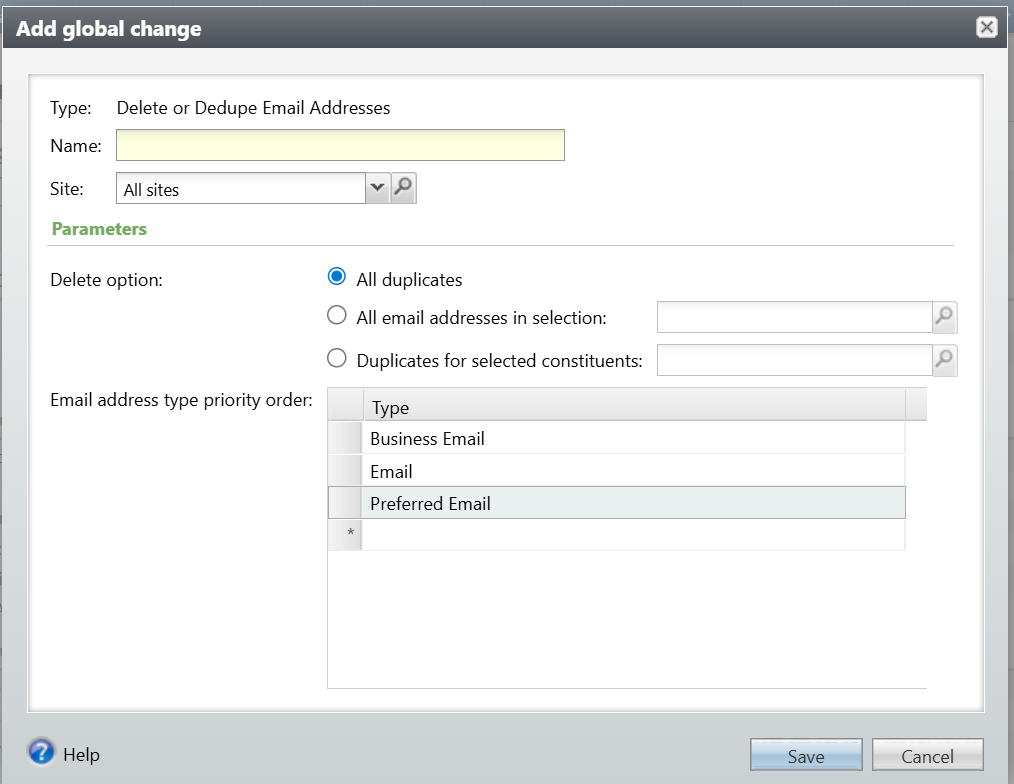
The parameters are:
- Delete option (choose one)
- All duplicates. This searches for and deletes all duplicates in the database. See below for the logic.
- All email addresses in selection. This will delete all records in the selection provided, whether they are duplicates or not. Note that a selection of email addresses requires a user-defined smart query.
- Duplicates for selected constituents. This searches for and deletes all duplicate email addresses for constituents included in the selection. This can be helpful to improve performance or to exclude specific constituents that should be reviewed manually, such as any prospects under management.
- Email address type priority order. This will be used to determine:
- Which email to retain when using the dedupe options, and
- Which email to mark Primary, when using either option, if the existing Primary record is deleted.
When selecting which email address to retain, the Global change uses this priority:
- Keep the record marked Do not email
- Keep the record per the order defined in the Email address type priority list parameter (see above).
- Keep the record with the earlier start date
- Keep the record with the latest date added
If, after the procedure runs, the Constituent doesn’t have a Primary email address (which is required by CRM), assign Primary to one of the records, using these criteria:
- Was NOT marked Do not email
- Per the order defined in the Email address type priority list parameter
- Latest start date
- End date is blank (end date can’t be filled in for a Primary Email)
- Date changed
Good to Know!
How Do I?