
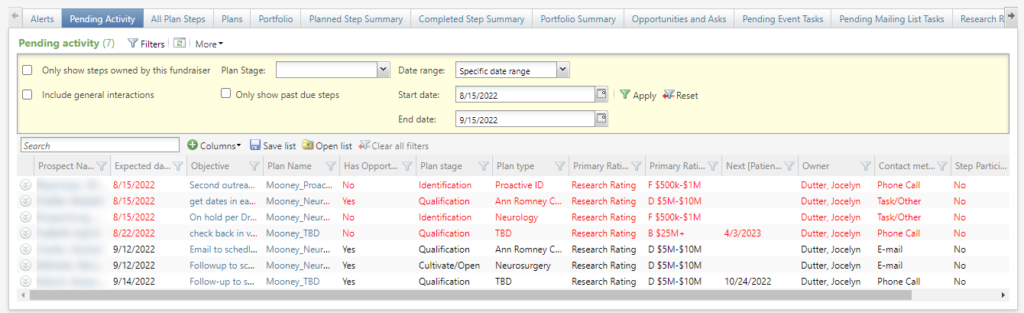
The Pending Activity tab of the My Fundraiser page contains a custom list builder that shows Pending plan steps and (optionally) Pending general interactions where the Fundraiser is the owner or an additional solicitor.
Available columns include
- Category Included in default display.
- Comment
- Constituent Lookup ID
- Contact method Included in default display.
- Expected date Include in default display.
- Has documentation Y/N. Included in default display.
- Has opportunity Y/N. Included in default display.
- Next [patient] visit date. From imported Epic data and subject to additional security. Included in default display.
- Next [patient] Visit Date Time. For future visits, shows the scheduled visit date and time.
- Next [patient] Visit Time. For future visits, shows the scheduled visit time.
- Objective Hyperlinks to the Plan Step page. Included in default display.
- Owner Included in default display.
- Plan name Hyperlinks to the Plan page. Included in default display.
- Plan stage Included in default display.
- Plan type Included in default display.
- Primary rating Included in default display.
- Primary rating type
- Prospect manager
- Prospect name Hyperlinks to the Constituent’s Prospect tab. Included in the default display.
- Step participants Y/N
- Step solicitors Y/N
- Subcategory Included in default display.
- Summary. When the include general interactions filter is selected, shows the Interaction summary. Includes a hyperlink to the Interaction record.
Filters include
- Only show steps owned by this fundraiser On the My Fundraiser page, the owner is the current user.
- Include general interactions
- Plan stage
- Only show past due steps Past due have an expected date prior to the current date.
- Date range
Good to Know!
- When a step is past due, the entire row will display in red.
- This same listbuilder is also present on the Fundraiser – Pending Activity tab under the fundraiser’s constituent record.
- For more information about Epic data security, see this entry on the Epic patient visits node in ad-hoc query and this one on Epic exclusion constituencies.