
The Recognition Programs area Donors Tab is a dedicated location to view those who are active or inactive (lapsed) within Recognition Program. The List Builder here can eliminate the need for additional recognition program reporting. Users can interact with this data to make outreach decisions and determine next steps.
For example, if you wanted to view LYBUNTs or Lapsed to a recognition program, you can filter your view to show Lapsed Status (filter indicated by the green funnel), sort by Date Achieved descending (indicated by the down arrow) so the most recent dates are at the top, and additionally filter to living constituents only if appropriate. Note that the Status is the current status as of today, and the Level is the most recent level achieved (not necessarily the current year level).
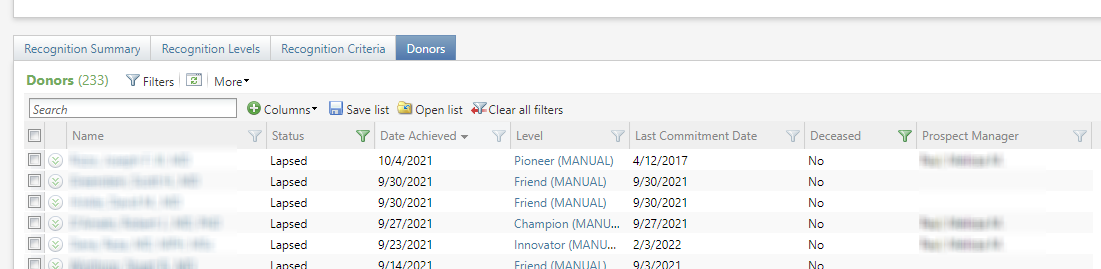
For the March, 2021, release, the following columns were added to the list builder.
- Prospect Manager Or Associated Prospect Manager.
- Primary Constituency
- Primary Rating
- Primary Rating Type
- Leadership Giving Model Score
- Total AG Commitments This is a smart field.
- Total AG Commitments Count This is also a smart field.
- Last AG Commitment Date Another smart field.
- Next Planned Step DateFor annual giving programs, this will show the next pending step date in any active fundraising plan with the business unit set to an annual giving unit(s). The donor may be the prospect or plan participant of the fundraising step. For Lifetime giving, this will show the next pending interaction/step on a fundraising plan, a stewardship plan or an interaction.
- Record Type Individual, Organization or Household
- Tier
- Last AG DM Launch Date Donor’s most recent appeal/direct marketing communication where the Appeal business unit is Annual Giving.
- Tribute Gift Yes or No if at least one qualifying gift is a tribute.
- Prior Year Level
- Prior Year Gift Amount
- Prior Year 2 Level
- Prior Year 2 Gift Amount
The list builder can be filtered by any column, and also with these options:

- Record Type Choose Individual, Household or Organization.
- Member View Choose Individual or Household. The household view will display the primary household member name only and the spouse name will be suppressed. This is preferred over the Household name so users can hyperlink directly to that record. The household view will also display any Individuals that are not apart of a household as well as Organizations that are members of the selected Society.
- Constituency
- Level Click on the filter icon to select one more more Levels to include.
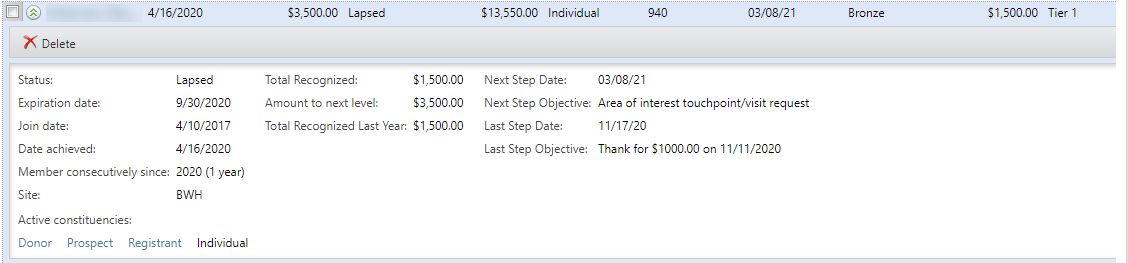
The secondary view (the “down carat”) shows this view:
Good to Know!
- The Level filter will default to the highest level if the datalist is trying to return more than 10,000 records.
How Do I?
- Manually override a recognition level for a constituent? Check out Recognition Programs/Manual Overrides
- Create or maintain a recognition program?