
This Global change can delete duplicate phone numbers or a selection of phone numbers.
A constituent is said to have duplicate phones if one or more instances of the exact same phone number exists, regardless of type or formatting; (508) 555-1234 is the same number as 508 5551234.
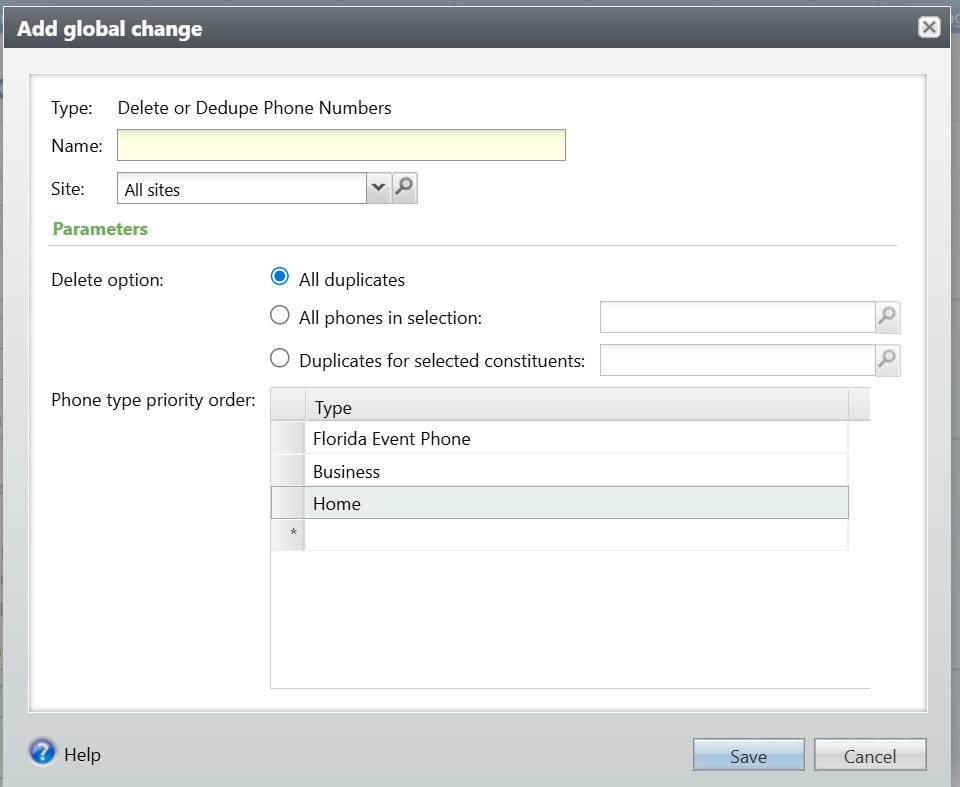
The parameters are:
- Delete option (choose one)
- All duplicates. This searches for and deletes all duplicates in the database. See below for the logic.
- All phones in selection. This will delete all phone records in the selection provided, whether they are duplicates or not. Note that a selection of phone numbers or email addresses requires a user-defined smart query.
- Duplicates for selected constituents. This searches for and deletes all duplicate phone numbers for constituents included in the selection. This can be helpful to improve performance or to exclude specific constituents that should be reviewed manually, such as any prospects under management.
- Phone type priority order. This will be used to determine:
- Which phone number to retain when using the dedupe options, and
- Which phone number to mark Primary, when using either option, if the existing Primary record is deleted.
When selecting which Phone number to retain, the Global change uses this priority:
- Keep the record marked Do not call
- Keep the record per the order defined in the Phone type priority list parameter (see above). In this example, if the same number is listed for both “Florida event phone” and “Home ” and neither or both are marked Do Not Call, keep the “Florida event phone” record. However, if multiple records have the same number, and one has type = “cell ” treat all records as “cell ”. This is because often constituents, particularly those created by the Epic imports, will have their cell phone number listed as both cell and home.
- Keep the record with the earlier start date
- Keep the record with the latest date added
If, after the procedure runs, the Constituent doesn’t have a Primary phone number (which is required by CRM), assign Primary to one of the records, using these criteria:
- Was NOT marked Do not call
- Per the order defined in the Phone type priority list parameter
- Latest start date
- End date is blank (end date can’t be filled in for a Primary phone)
- Date changed
If the only available phone number is marked Do Not Call or has End Date filled in, blank out Do Not Call or End Date. This is a CRM requirement.
Good to Know!
How Do I?