
Blackbaud’s complete Duplicate Constituents and Merge Tasks Guide can be found here.
To identify and merge duplicate constituents….
- Find Duplicate Constituents using duplicate search processes (Constituents >> Duplicates >> Duplicate Constituents Search Process).
- Review the Primary Merge configuration, which determines the information to merge from the source record to the target record (Constituents >> Duplicates >> Merge Constituents Processing >> Constituent Merge >> Merge Configurations). If this doesn’t suit your needs for merges in general or for any particular merge process, we recommend creating a new merge configuration.
- Add a merge process (Constituents >> Duplicates >> Merge Constituents Processing >> Constituent Merge >> Merge Processes). This process will merge records identified as duplicate constituents based
on the merge configuration you select. - Preview the merge process. Before you run the merge, go to the list of merge processes & click on the merge process name; select the Preview Merge tab. On this tab, review the source and target records that will be merged. If you notice records that should not be merged, select them and click Do not merge; this creates a do not merge relationship between the two constituents, and constituents won’t be merged if they have any sort of relationship.
- Start process!
Martin’s Constituent Merge Tips and Tricks
How do I keep juniors and seniors and other family members from being picked up as possible duplicates?
- Remember that the CRM won’t merge constituents if they have any sort of relationship.
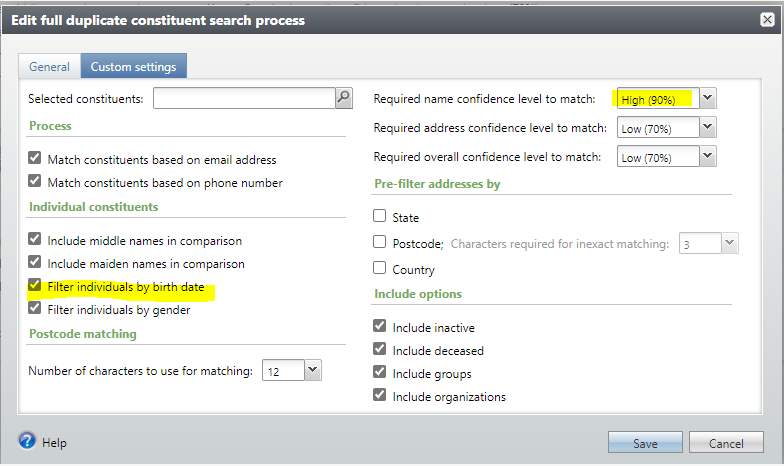
- Use custom settings in the merge process.
- Check Filter by birth date; this should eliminate family members if we have birthdates for both.
- Set Required Name Confidence level to High (90%); this helps when people with similar names live at the same address.
Good to Know!
- MGB Automated Duplicate Merging Process – this can save you time in the long run by automatically merging the duplicate constituents with a very high match percentage, and you can then focus your time on the matches with lower percentages that need additional review.
- Blackbaud’s complete Duplicate Constituents and Merge Tasks Guide can be found here.
- CRM’s OOB merge task considers two addresses duplicates if the address type, street, city, state, ZIP code and DPC, CART, and LOT values. These values are set by the address validation process and are useful to the post office, but they change frequently, so if you merge two constituents with the same address that were not validated at the same time, CRM might determine that they are two distinct addresses when they are not. This resulted in unnecessary duplicate addresses. The Addresses merge task has been replaced with a custom version that does not consider these fields.
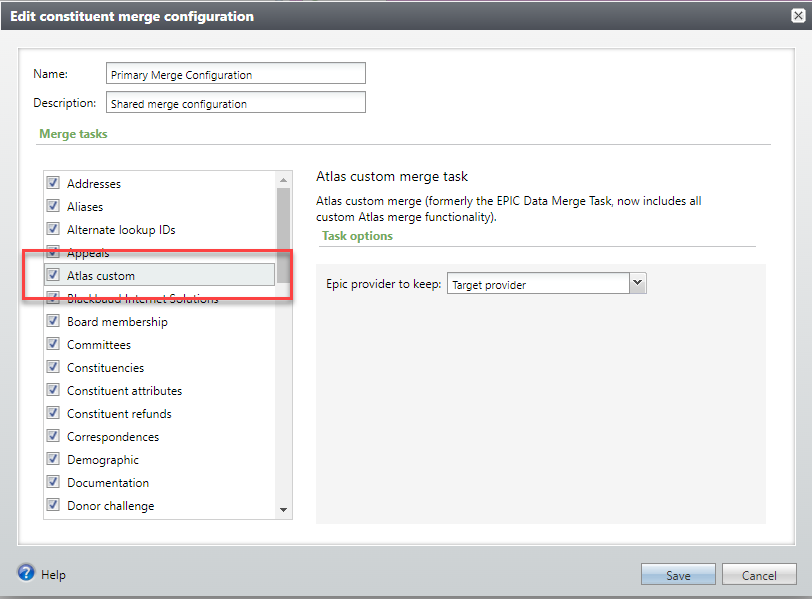
- Besides the custom addresses merge task referenced above, all other custom Atlas functionality is included in a single merge task called Atlas custom; this task includes the code to merge Epic data, custom tribute acknowledgee data, and custom stewardship participant data.
How Do I?
- Add a relationship between two constituents?
- Learn more about the custom view form on the preview merge tab?