
Finding Tributes
You can find a tribute in a variety of ways
- Under Constituent, click Tribute to see all tributes. You can filter the results by create date, type, etc.
- If you are on a constituent page, go to Revenue/Tributes tab to see all tributes for this constituent, or where this constituent is an acknowledgee
Creating a new tribute
To add a new Tribute, see Constituent/Tributes
Adding Tribute Gifts
1. Enter a gift on a constituent record.
2. Click the Revenue tab, and then on Tributes to open the Tributes window.

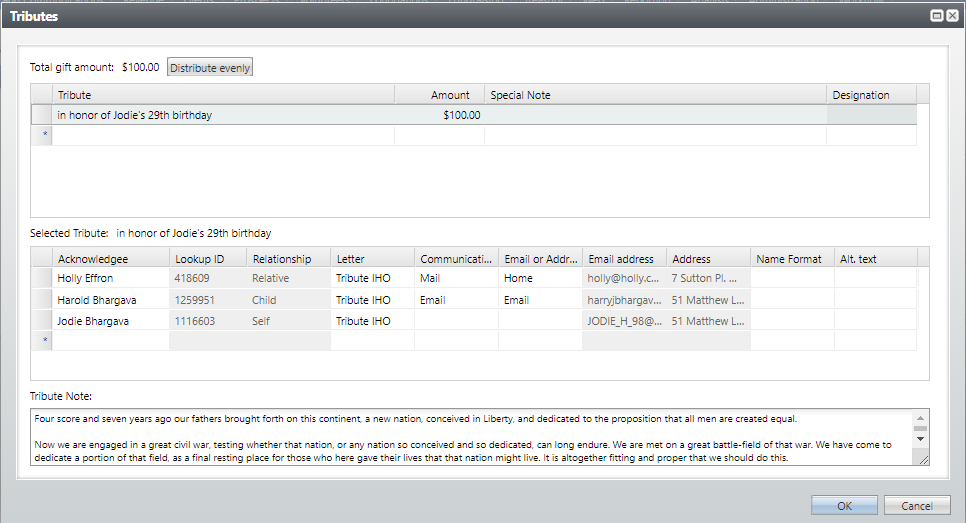
4. Click in the Tributes field, and search for a constituent in the Tributee last/org name: field.
6. In the Amount field, enter how much of the revenue amount to apply to the tribute. The tribute amount cannot be more than the total amount of the revenue. If you apply the full amount of the revenue to the tribute, you can apply only one tribute to the revenue.
Default Acknowledgees are listed below, including the Lookup ID, Relationship to the Tributee, and the address (hover over the Address column to see the full address); this is designed to help users assess whether or not they need to add more acknowledgees for this particular transaction. You can also update Communication Preferences (Mail or Email and which type of Mail or Email), Name Format, and Alternate Text.
The very bottom of the screen shows the Tribute note.
7. Click Save.
Good to Know!
- Tributes are added at the overall gift level, not at the split level.
- You can turn off notifications in a one-off situation, but need to commit the batch first, then go back and edit the letters afterwards.
- There is no easy way to “go to” a tribute while in batch, you could open CRM in a separate browser tab (by right clicking and choosing duplicate) and look there. Right now this is the recommended way to create a tribute or edit one while in batch
- Tribute Amounts: tribute amounts are set to zero in Atlas with global changes, and the reason for setting the tribute amount to zero was consistency with RE.
In RE there is no amount associated with a tribute, so the full amount of the gift is used when reporting tribute totals. If one gift has a 3 tributes, we would use the full amount of the gift to report totals raised for each of the tributes.
Atlas has a the ability to have a different amounts for all the tributes, but the total of the tributes cannot exceed the amount of the gift. So if a gift is split between different tributes, we would be unable to credit each of the tributes with the full amount of the gift. In Atlas if one gift has say 3 tributes, then the tribute amount cannot be the full amount of the gift for each tribute. The design team wanted to keep the tribute amount as the full amount of the gift for consistency with RE, and because we usually don’t ask donors what percentage of a tribute gift should go to which tribute.
- Additional Notificants are added with a revenue attribute, in the same way this was done in RE
- To add a non-constituent tribute, just skip over the search for the tributee and the selection of a name format, and enter the appropriate tribute text in the “Tribute text” field.
