
Someone mentioned a great report but I don’t see it on my Reporting tab in Atlas
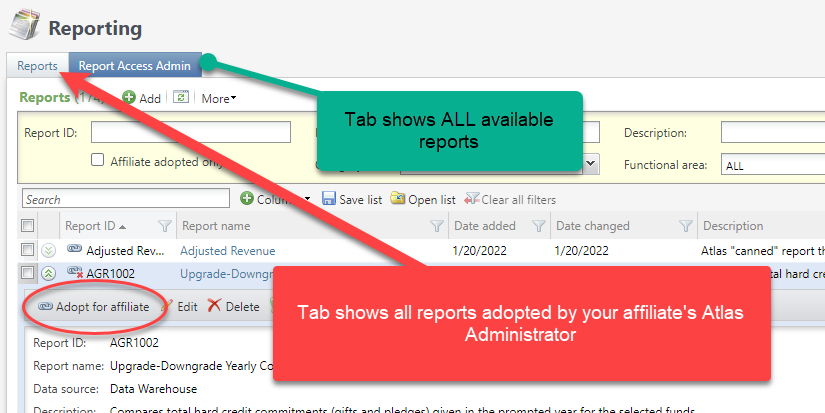
When MGB adds a new report we push it out to all affiliates. All reports that have already been adopted for your affiliate by your affiliate’s Atlas Administrator appear on the “Reports” tab. If you hear of a report that you don’t see on the “Reports” tab, please contact your Atlas Administrator or add a ticket and the EDO can adopt it for you.
How can I quickly access the reports I use all the time?
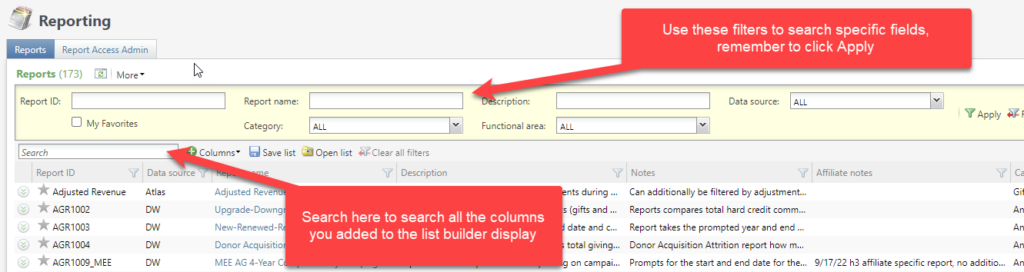
You can favorite the reports you use frequently. Just click on the star that appears at the far left, this sets the report as a favorite for you. To see only your favorites, check the “My Favorites” checkbox in the yellow filter section and click appy.

How do I know if there is already a report that does what I want?
The display of reports is a list builder, which means you can choose which columns you can add to the page and the order you want them to display. We add information about the reports to the report description and the report notes. We try and document the reports as fully as possible, adding information on fields, keywords, and purposes so you can search the reports easily.
Can I make notes on a report that pertain only to my affiliate?
Yes! Your affiliate’s Atlas Administrator can edit reports and add Affiliate notes. These notes are specific to your affiliate and not visible by other affiliates, and will not be changed if we need to update the reports notes or other report information.
Which reports have been added recently?
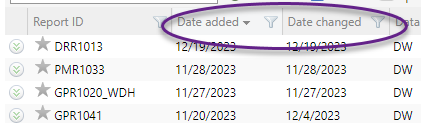
You can add the date added or the date changed columns to the list builder page, and if you sort descending the most recently added reports will appear at the top.
Can I set up a report so only certain people can run it?
Yes you can, reports can be permissioned so only certain users or specified groups of users can run it. Add a mojo ticket for help.