
When building a Revenue query, you can include records based on the relative calendar or fiscal year; that is, instead of searching for records where the fiscal year = 2021, you can search for records where the fiscal year is the current fiscal year, and Atlas “knows” what the current fiscal year is and can find records with that year.
You can find these options under the Revenue Date node…
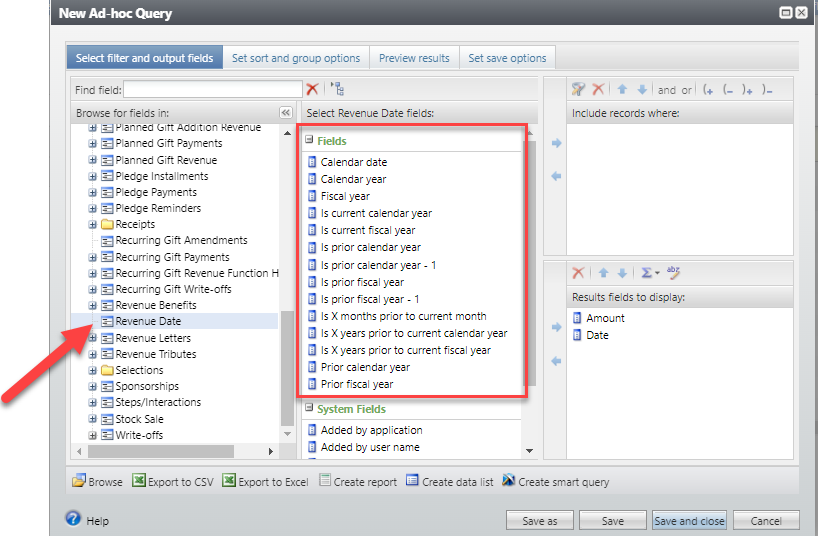
If you want to include only records for the current fiscal year, choose is current fiscal year, and then select Equal to Yes.
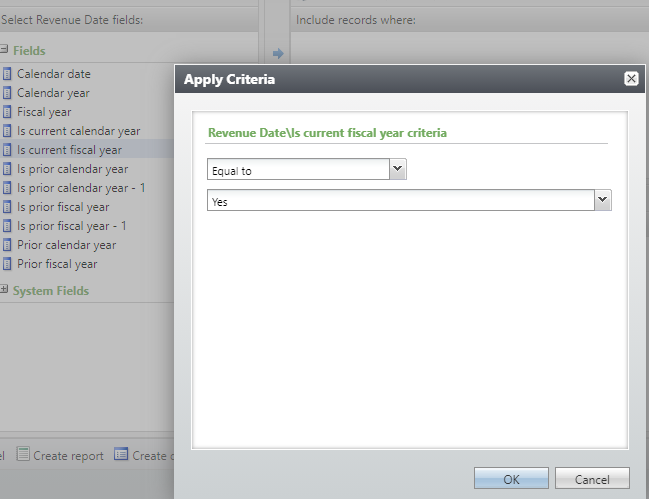
There are also options for Is prior fiscal year, Is prior fiscal year – 1, Is current calendar year, Is prior calendar year and Is prior calendar year – 1. You can also indicate a specific number of years. For instance, to return records where the year is 2020, 2021, or 2022, use this:


Good to Know!
- These fields are also available for Revenue Recognition Credits in the Revenue Recognition Effective Date node.