
Purpose and designation have a one to one relationship in almost all cases at Partners. The purpose side has more stewardship related information, and the designation side is more GL and financial based.
Once created, you can add additional information to the purpose. Note that primary fields for the purpose are edited using the task on the upper left. This is also how you mark a purpose Inactive. (Once a purpose has been marked inactive, the word “inactive” will appear in red in the General Information area.)
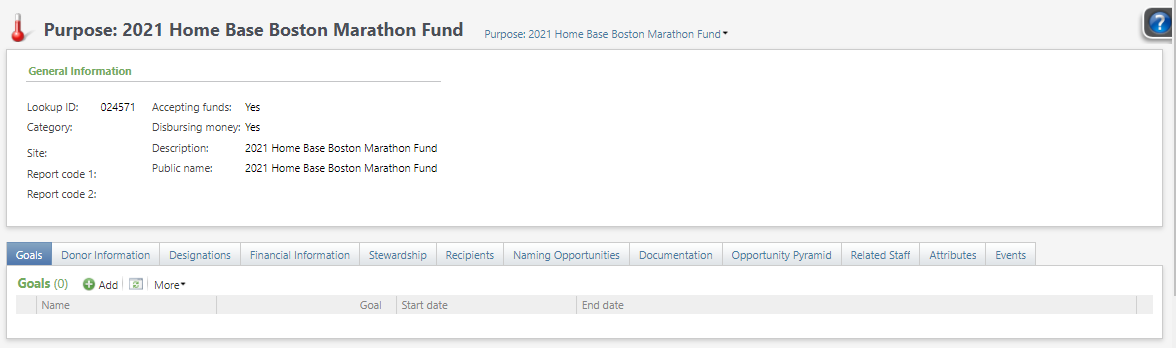
Purpose Type = Partners is using a placeholder of “Purpose”. All purposes should use this type
Purpose Report Code – A way to additionally group purposes. Conversion Note: BWH Endowment Classification fund attribute.
Goals – add goals as appropriate. These can have start and end dates and you can add multiple goals.
Donor Information – will display information for donors to this purpose
Designations– lists associated designations and hierarchies
Financial Information – shows value of fund, disbursements, etc. RE fund attributes relating to market value, gift corpus and estimated spending distribution converted here. Conversion note: RE Estimated Spending Distribution to Purpose/Financial Information/Total Disbursements, RE Gift Corpus to Purpose/financial Information/Book Value Start Attribute date to start and end date, attribute description to Book Value Start, and RE Market Value to Purpose/Financial Information/Market Value Attribute date to Start and End Date, Attribute Description to Market Value Start
Recipients – scholarship, chair and professorship recipients. Some RE Fund Relationships converted here: Chair/Professorship, Chair/Professorship – Lead Donor, HMS Professorship, Honoree, Incumbent, Incumbent – Former, Resident/Fellow, Resident/Fellow – Former
Naming Opportunities – Naming ops associated with this purpose
Stewardship – detail on the type of stewardship needed, and any constituents receiving stewardship. RE Fund relationships for stewardship recipients and primary donors converted here. Note that constituents can only have one stewardship relationship in CRM, so if a donor had multiple stewardship relationships in RE only one converted. Some of the RE Fund Relationships that converted here are: Donor, Naming Opportunity Donor, Primary Donor, Stewardship Report Recipient and Stewardship Report Recipient – Former
Documentation – notes and attachments. RE Fund Attributes for Fund Purpose and Fund Note converted here
Opportunity Pyramid – links to plans and opportunities
Related Staff – PI and fund administrators. Some RE Fund Relationships converted here: Department, Development contact, Division, Fund, Fund Administrator, Fund Administrator – Former, Medical Specialty, Physician/Faculty, Primary Care Physician, Primary Investigator, Primary Investigator – Former, Primary Investigator Report CC: and Staff Contact
Attributes – attributes related to the purpose
Events – lists events related to the purpose, with links to the Event record and the Invitees tab
Conversion Notes:
- Some of the RE Fund attributes converted here instead of designation. These include: Exclude from Qualification/Stewardship, Logo, Market Gain/Loss, Needs Customized Acknowledgement Language, Stewardable fund, Stewardship Fund type
- Some affiliates had chairs, professorships or awards coded in RE as constituents. These converted to the purpose in CRM instead of as constituents, see Chairs, Professorships and Awards
Good to Know!
- The Add and Edit Stewardship Recipient forms are customized with two additional fields: comment and user.
- Note that the column “Accepting funds = Yes” should not be interpreted as an active status. End date is also not a good indicator. Often a fund is active in PeopleSoft, but development should no longer process gifts to it.