
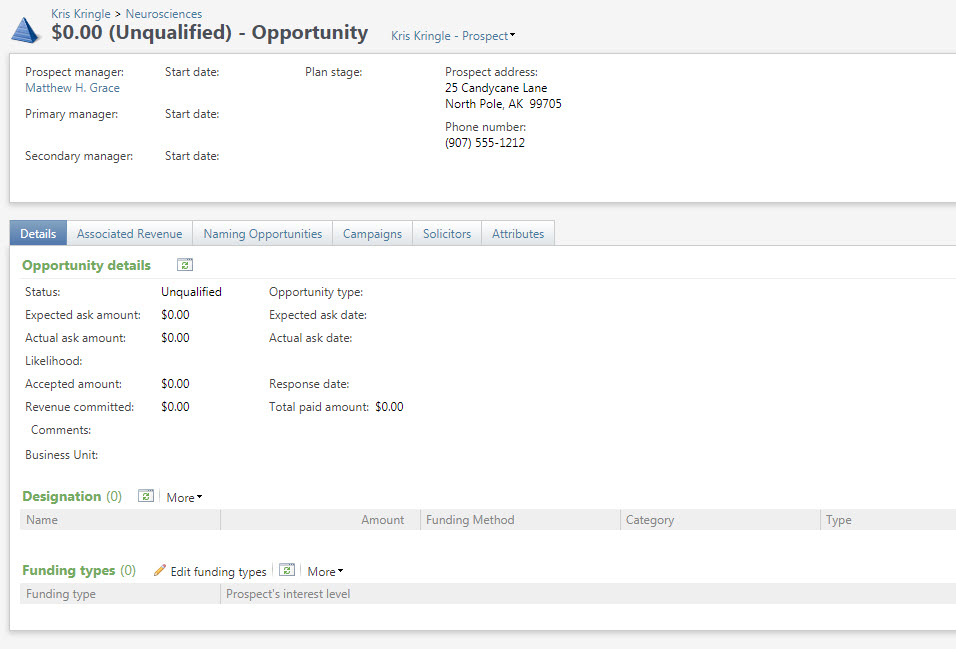
Opportunities are used for specific asks. One plan can have multiple opportunities.
Good to Know!
- Payments can only be applied to one opportunity, you cannot split a payment between multiple opportunities.
- When viewing the Plan/Opportunities tab you see a summary of all the opportunities associated with this plan. You need to click the “Go to opportunity” task to see detail on the specific opportunity

Opportunity Entry

Note: Different statuses affect the behavior of the form, for example if the opportunity is unqualified you cannot add an ask amount or date. (RE Proposal Status converted to an opportunity attribute for validation purposes)
Status: These are fixed in RE, so we have adapted our proposal statuses to opportunity statuses
· Unqualified – still in cultivation, not ready to be solicited yet
· Qualified – prospect is ready to be solicited for this opportunity
· Response Pending – Ask has been made and written response is pending. All but BWH include Verbal Commitments here
· Accepted – the gift is accepted and closed. BWH includes Verbal Commitments here
· Rejected –proposal is declined
· Canceled – opportunity not proceeding forward
Verbal commitments in Atlas have a status of “Response Pending” and a plan stage of “Verbal Commitment” Note that the plan stage is set by the stage on the next pending planned (as opposed to pending) plan step. As you change the stage on this step you will see the plan status change as well to match the step stage. BWH, SRN , CDHC and MEE have a slightly different process; they define verbal commitment as a opportunity status of “Accepted”, the response date is not blank, and NO revenue has been associated with the opportunity.
(Conversion Notes: Unqualified – (RE proposal status of Cultivation, Identification, blank proposal status, Qualification, “No Status” or RE proposal status is blank or null), Qualified – (RE proposal status Ready for Solicitation), Response Pending (RE proposal status=”Solicitation Made”, “Verbal Commitment”), Accepted (RE proposal status = “Gift Closed”,”Gift Closed – MGH”, “Gift Closed – HMS” “PG Partial Distribution”,”PG Final Distribution”,”PG Notification”)
· Rejected – (RE proposal status of Declined)
· Canceled – (RE proposal status of “Deferred to next FY”, “No Ask Made”
Opportunity Type: Affiliates can use this field as needed to help categorize their opportunities
Expected ask amount/date: These columns will be hidden for all affiliates except for BWH.
Ask amount/date: Asked amount and date (converted from RE proposal Asked Amount/Date (field relabeled at Partners, OOB RE field is called RE Expected Date/Amount)
Likelihood: likelihood of this opportunity being accepted (converted from RE likelihood)
Accepted amt/Response date: Amount received, date received (converted from RE proposal Received Amount/Date)
Opportunity Splits: a specific designation is not necessary to enter other fields in this area
- Amount: Amount associated with this split (TBD if we need to convert an amount here)
- Designation: Designation (RE Fund)
- Use code: (from RE Fund Type on the RE Proposal Fund)
- Category: If appropriate choose beat/area (RE Proposal Purpose, left blank for BWH only)
- Type: if appropriate, choose type (RE Proposal Type of Gift, for BWH only converted if type of gift = ‘Campaign’)
- Funding method: If appropriate, add funding method (RE Proposal Instrument)
Comments: general comments about this opportunity (Nothing converted here except for BWH if RE proposal status = ‘Gift Closed – HMS’ Set comment = ‘Donor made gift but not to BWH’)
Campaign: (RE Campaign)
Opportunity Attributes: (RE Proposal Attributes) Additional attribute for business unit created following the same logic as the Plan Business Unit.
Additional Opportunity Components/Tabs
Details
Associated Revenue: There are some differences from RE in this area. In Atlas a revenue transaction can only be associated to ONE opportunity. And only gifts and pledges can be linked, not an individual pledge payments. For events, the event registration is linked to the opportunity.
- If the opportunity is related to event fundraising, the event registration should be linked to the opportunity (In RE the registration payment was linked to a proposal, in Atlas the registration itself is linked to the opportunity)
- If pledge is linked to opportunity, payments to pledge will be linked to opportunity automatically. However there is a “bug” where if a pledge with existing payments is linked to an opportunity, the existing payments don’t automatically link.
- One pledge cannot be linked to multiple opportunities
- If you want a pledge to be linked to multiple opportunities, you will need to split the single pledge into multiple pledges, eg $50k pledges to 2 opps becomes 2 $25k pledges each linked to an opp.
- Recurring gift payments cannot be linked to an opportunity
Solicitors
How Do I?
- links to other areas, longer blurbs