
When a user needs to be removed from your Atlas database, either because they are leaving Mass General Brigham or moving to another affiliate, enter a User Security ticket in Mojo. These steps will be performed:
- Mark the user inactive. This ensures that the user can no longer log into Atlas.
- Remove the user’s system roles. This step ensures that they cannot be referred to in various parts of the application that rely on security (they cannot be assigned to a batch, for instance).
How to Mark a User Inactive in Atlas
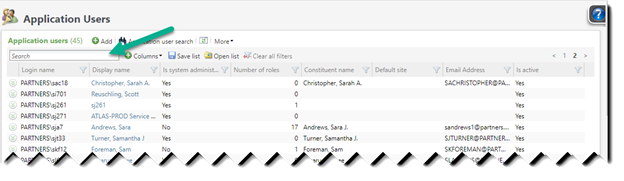
Navigate to Application Users: Click on Administration > Security > Application Users to open the user list.
Type part or all of the user name in the Search box to find the record you need. You can also click on any column header to sort by it.
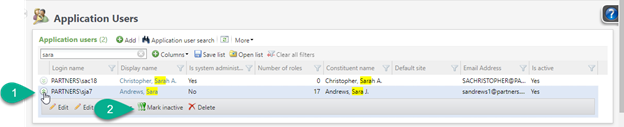
Click on this chevron icon to open a record, and then click on Mark inactive.
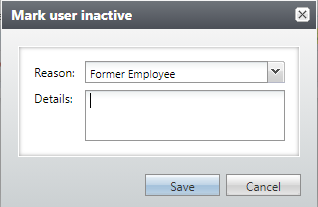
When you mark a user Inactive, you have to select a Reason Code. Select one from the drop-down list. (Affiliate Administrators will also be able to type directly in the Reason Code box and create a new code.) Add an optional Note in the Details area, and click on Save.
Remove System Roles
Marking a user inactive will ensure that they can no longer log in to Atlas, but other users will still be able to see their name in various places of the application; for instance, they could still be assigned to a batch.
To make sure that doesn’t happen, you can remove their System Roles.
Click on the user’s name to open the record.

This opens the list of this user’s System Roles.
To remove the System Roles one at a time, click on the chevron to open each one…
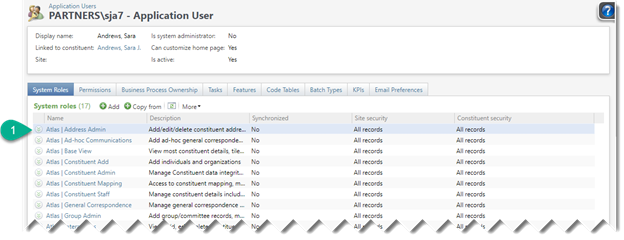
And then on Remove.

If a particular user has more than a few roles, it will be easier to use them with the Copy from feature. Just copy from a user with no roles at all, like a System Administrator and be sure to select the option to Modify or remove any existing roles on the target user to exactly match the source user. (System Administrator status will not be copied.) Click here for instructions on using this feature.
Good to Know!
- Affiliate Administrators have permission to inactivate users and manage system roles. However, please still enter a ticket in Mojo so these individuals can be removed from distribution lists, etc.
- If you’d prefer that System Roles not be removed from a user (you want to use those roles as a template for a new user), just note that in the Mojo ticket, and the development office won’t remove those roles.
- You should also consider a review of the Business Processes owned by a former user and decide if these items should be deleted or if ownership should be transferred to a current user via the Edit Business Process Owner feature.
- Don’t forget about any BVDL Email Notifications the user might be receiving.
How Do I?
- links to other areas, longer blurbs