
This Global Change can be used to update the following fields for a selection of Opportunities.
- Opportunity type
- Opportunity status
- Ask Amount and Date
- Expected Amount and Date*
- Anticipated Amount and Date
- Response Date
- Accepted Amount
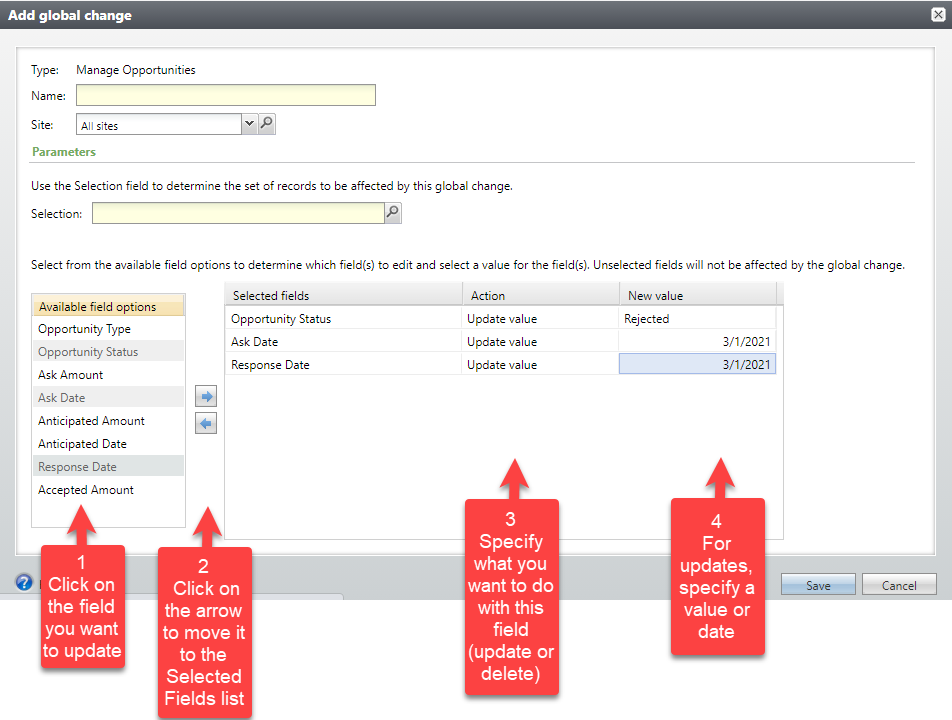
The parameters are
- Selection The Opportunity selection of records to update. Required.
- Selected fields Click on individual fields in the Available field options list, and then on the right arrow to move it to the Selected fields list.
- Action Choose Update Value or Delete Value. Amount fields can’t be deleted, but they can be updated to 0.
- New Value Choose the value for Updates. For code-driven fields, like opportunity status and type, you can select from a drop-down list. For date fields, use the calendar to pick a date or just type a date into the field.
*Expected Amount and Date are only available if the custom opportunity validation is not enabled.
Good to Know!
- In the Edit Opportunity window, if a user sets Status = Rejected, Ask Date and Response Date are required. In order to keep opportunities updated via this global change consistent with opportunities updated “manually”, if you try to create an instance of this global change setting Status = Rejected, and you don’t also include Ask Date and Response Date, you won’t be able to save the instance.
- If you update Anticipated Amount, the values in the designation grid will also be updated proportionally.
How Do I?