
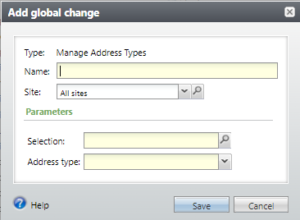
This Global Change can be used to modify the Address type on a selection of addresses. It can be found in the Constituent\Addresses node.
The parameters are
- Name (required)
- Selection (required). Click on the Search to search for and select an Address selection.
- Address type (required). Choose the Address type from the drop-down list of active address types.
Good to Know!
- Constituents cannot have duplicate addresses. If the global change would create duplicate addresses (for example, you are attempting to change address type from NULL to HOME, and the constituent already has that exact same HOME address), those addresses are skipped and reported as exceptions.
- There are corresponding Global changes to manage Email address types and Phone types.
- You cannot create an Address selection directly via ad-hoc query. Instead, create a user-defined Smart Query Definition that includes the Address System Record ID.