
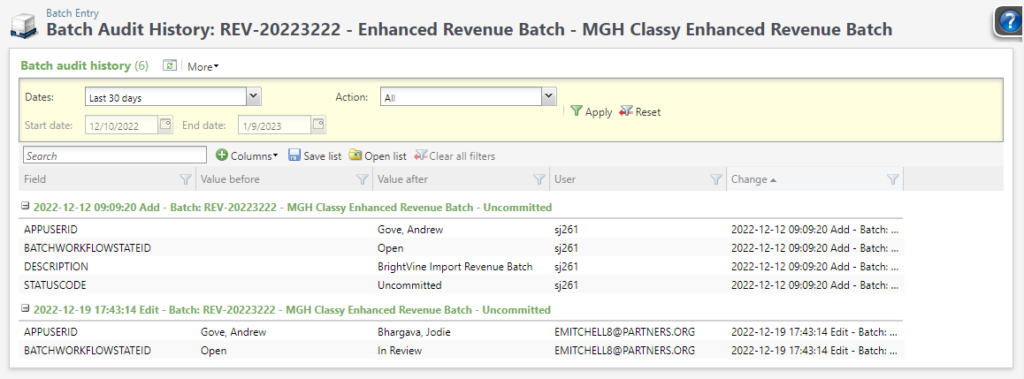
The Batch audit history list builder shows the audit table for batch fields such as status and owner. (It does not show changes to the rows in the batch.)
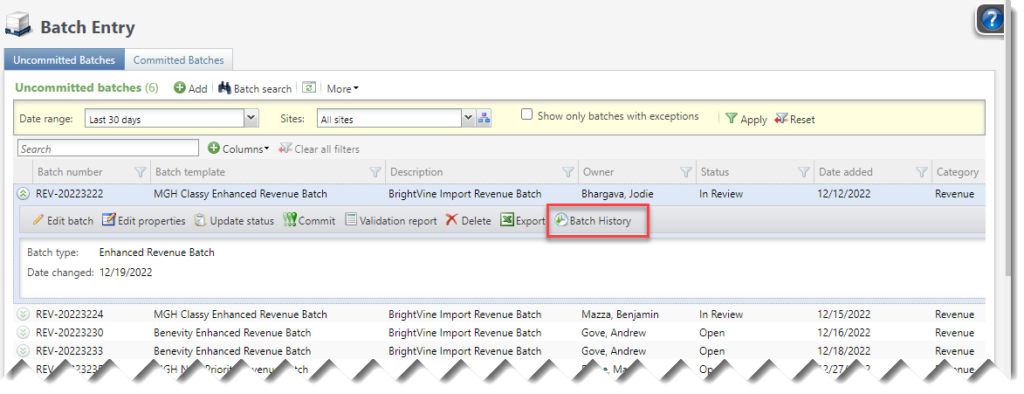
The available columns are
- Action. Add, Edit, or Delete.
- The software through which this change was made. Most of the time, this will be some variation of Blackbaud App Server.
- Audit record ID The GUID on the Audit record. Users typically won’t find this useful to include in the list builder, but it will be helpful for support to find a specific audit record when needed.
- Change This field concatenates the fields listed below into one. Users will likely find it helpful to include the Change field and to Group by it, as well; see the screenshot above.
- Datetime
- Action (Add, Edit, or Delete)
- Table
- Record description
- Date The date and time this record was Added, Edited, or Deleted.
- Field The name of the field.
- Record description A description of the specific audited record (batch number + template description + status)
- Record type and Currently, this list builder only shows changes for the Batch table, so these fields will always read “batch”. Users won’t fine it helpful to include these.
- User The user who made Added, Edited, or Deleted the Record.
- Value after For Edit rows, the value after the edit was made, and for Add rows, the value that was added. For Delete rows, Value after will be blank.
- Value before For Edit rows, the value before the edit was made, and for Delete rows, the value that was Deleted. For Add rows, Value after will be blank.
The filters are
- Dates. Choose from All dates, select a pre-defined data range, or select Specific dates an enter Start and End date.
- Action Choose All, Add, Edit, or Delete.
You can also filter by any column by clicking in the column header, and you can use the text Search box to search for specific strings.
Good to Know!
- Add short bullets for important info about this area, conversion info, entry info, etc
How Do I?
- links to other areas, longer blurbs