
A task to Merge two constituents has been added to the list of available Tasks while on a Constituent record.
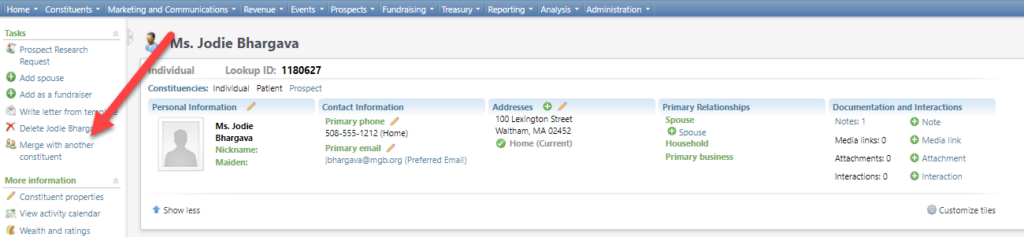
This Task launches the Merge two constituents window; users can add a shortcut to this window, but the benefit of using the new task is that it will default the current Constituent record into the Source constituent parameter (so there’s no need to search for it).
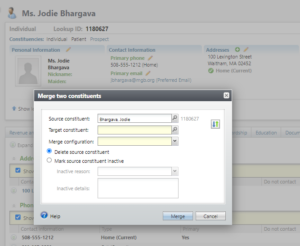
This is a custom version of the Merge two constituents window with two custom features.
- The Source and Target constituents Lookup IDs are visible to the right of the Constituent name to better able to distinguish between the two (since they likely have the same name!), and
- This version contains an option to Switch the Source and Target constituents.
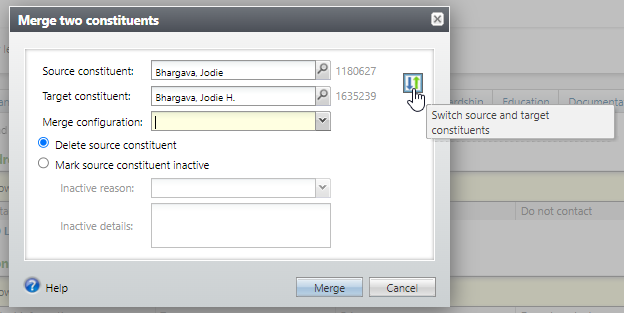
The Source constituent is the one that will be deleted (or made inactive). Click on this button to make the Source constituent the Target constituent and vice versa. While the CRM merge process retains all data from most tables during the merge process (like addresses and interactions), for some information (like birthday and Date Added), it can only retain the Target value, so users might prefer one value over another.
Good to Know!
- This Merge two constituents window can also be launched from the Merge preview tab.
How Do I?