
A customization is a feature not included in Blackbaud CRM that was developed specifically for Atlas. This includes something as simple as a new ad-hoc query type and something as complex as a whole new tab. In all cases, these items will be subject to Design Team Approval. New ideas for customizations can be entered in Mojo or Asana.
Bug fixes may or may not require Design Team approval. Some defects are obvious (e.g. a typo) and some require discussion (e.g. re-ordering the fields in a window). Bug reports should be entered in Mojo or Asana; these issue will be reviewed in the weekly Triage meetings and either assigned to a developer to fix or added to the Design Team agenda for discussion. (See the Atlas Defect Management document on the Atlas Tech Team Sharepoint Library for defect management workflow details.)
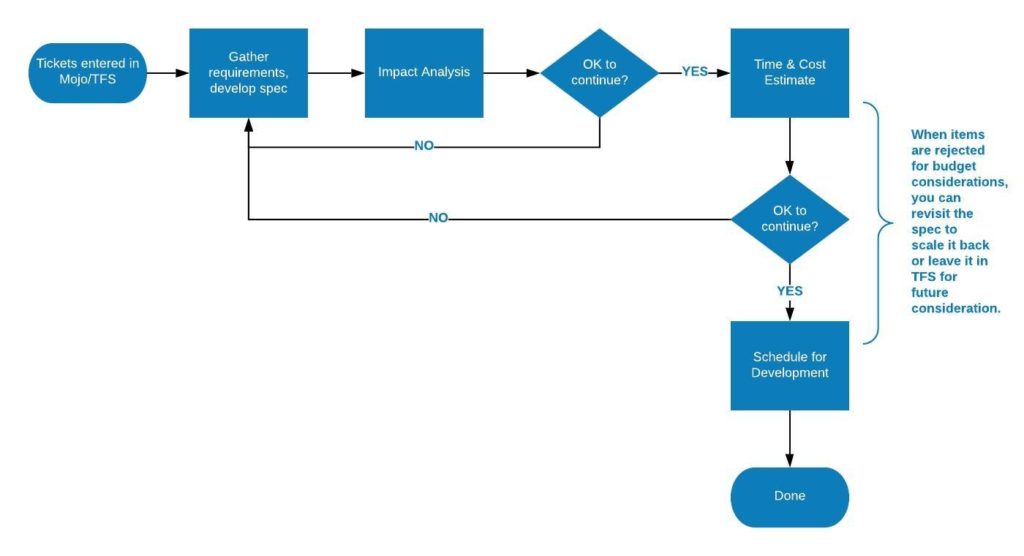
- The MGB Applications Team will host regular (weekly) triage meetings to review RFCs. Those requiring DT approval will be held for the DT Customizations Meeting.
- RFCs that require DT approval will be assigned a Business Owner, typically a representative from an Affiliate. The Business Owner will gather user requirements and begin crafting the specification document (“spec”).
- Once requirements have been defined, the spec will be handed over to a Business Analyst for design and technical clarification, with the goal of turning the requirements identified by the Business Owner into a structure suitable for implementation in Atlas.
- The spec will again be reviewed by the Design Team for final design approval.
- The Applications Team adds the time and cost estimate. (Depending on the request, this may require enlisting the help of a consultant.)
- The time and cost estimate is sent to the Design Team for final approval.
- If the estimate is acceptable, the RFC goes into the backlog for scheduling.
- If the estimate is not acceptable, the Design Team can revisit the functional spec to “scale it back” and find a more reasonable solution.
How Do I?