
Atlas includes a customization whereby Interactions can be linked to Revenue to facilitate the Custom Acknowledgements Process.
This customization includes (1) a Revenue tab on the Interactions page, where you can Add, Edit, View, and Delete associated Revenue transactions, (2) a Documentation and Interactions tab on the Revenue page, where you do the same, and (3) custom listbuilders to show details information.
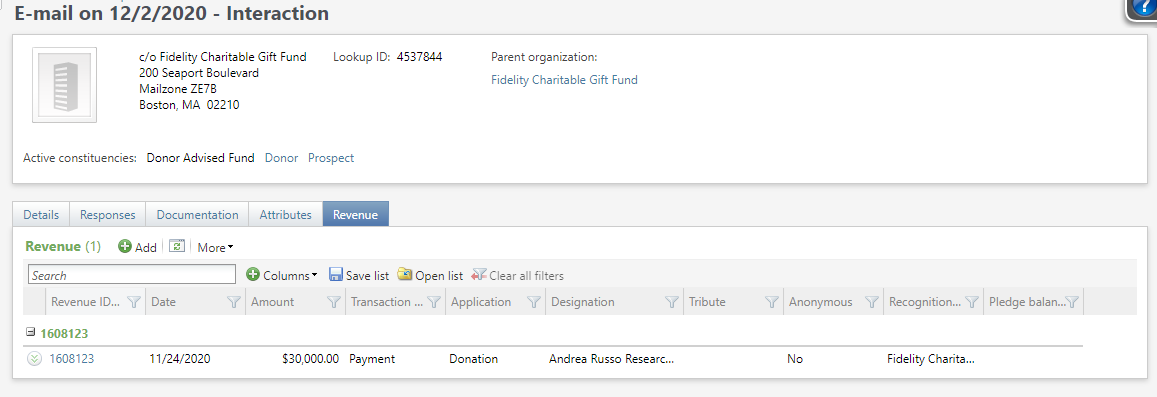
The Interaction page has a Revenue tab showing the transaction Application Amount, Transaction Date and Type, Pledge Balance, Designation, Tribute, and/or Recognition Credit constituents for any associated revenue. (If there are multiple constituents recognized, they will all be listed, separated with commas; you can hover over the column with your mouse to see the entire list.)
Click on Add to launch Transaction Search and select a record to associate with this Interaction. Click on the chevron to find Edit and Delete options, or click on the Revenue ID column to open the Revenue record.
The Revenue page has a Documentation and Interactions tab with a listbuilder that includes Interaction date, Status, Owner, Summary, Contact method, Category, Subcategory, and Constituent Name for any related Interactions.
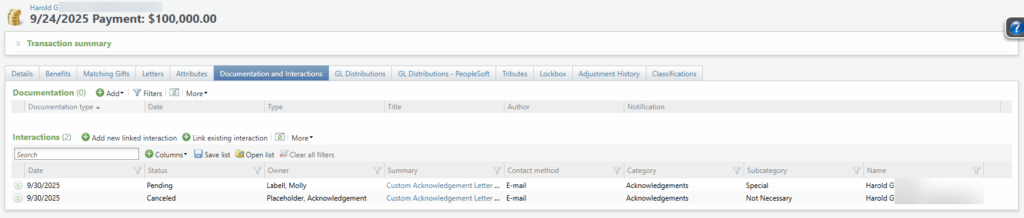
Click on Add a new linked interaction to open an Interaction add page; this will allow you to add a new Interaction related to this revenue transaction.
Click on Link existing interaction to launch a search form enabling you to search for an select an existing Interaction to relate to this transaction.
Click on the chevron to find Edit and Delete options, or click on the Summary column to open the Interaction record.
Good to Know!
- All users can see the Interactions revenue tab and the Revenue Documentation and Interactions tab, but only users with the Interaction revenue system role can Add, Edit, and Delete.
How Do I?
- Manage the custom acknowledgement process and see which letters are in which stage? Go to Prospects, Stewardship Administration, Manage Custom Acknowledgements
- Add Constituent Interactions?