
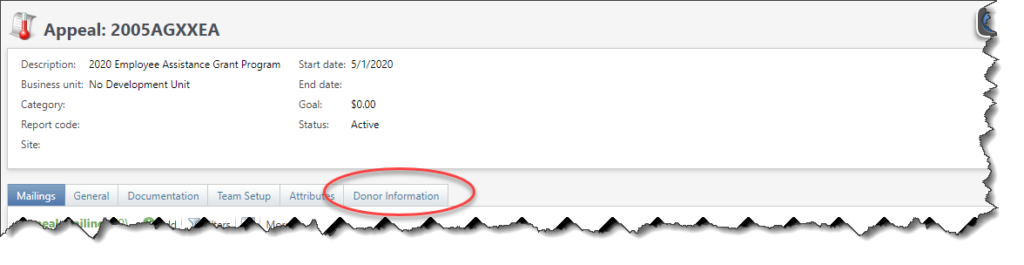
Atlas has a dedicated location to view and/or edit Appeals and any marketing efforts or mailings they have been connected to. This new Donor Information tab also provides a simple way to see the donors who have made a commitment to a particular Appeal. (Note that the Appeal Donor Information tab is modeled after the Purpose Donor Information tab.)
Open an Appeal, and click on Donor Information.
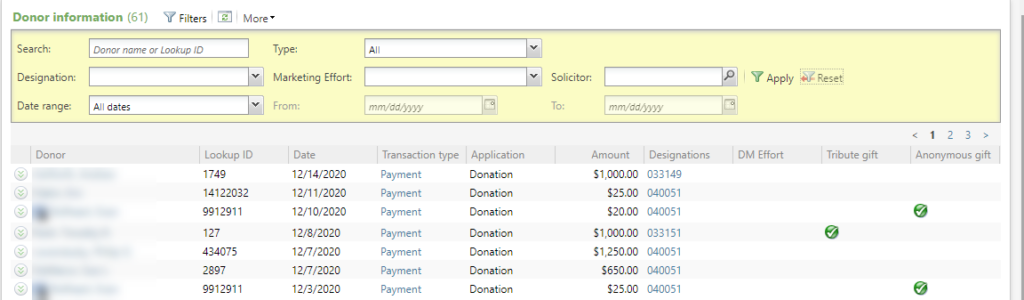
The columns listed are:
- Donor Name You can also group by donor name.
- Lookup ID
- Date. Gift Date.
- Transaction Type You can also group by transaction type.
- Application
- Amount
- Designations You can hover over the column to see the Designation Name. You can also group by designation.
- DM Effort Direct Marketing Effort Name.
- Tribute gift Show a check mark if this is a tribute gift.
- Anonymous gift Shows a check mark if this gift is anonymous.
- Solicitors
- Total paid
- Write offs Write-off amount.
- Balance Pledge balance.
- # of payments made
- Last Payment date Last pledge installment paid date.
You can filter by
- Donor name
- Designation
- Date range
- Transaction Type
- Marketing Effort
- Solicitor
Each record also has this secondary view, which you can access by clicking on the chevron in the first column. The details here include Campaigns, Effort, Opportunity, Tributes, Sites, and an Anonymous flag.

Good to Know!
- The Donor Information List does not show $0 transactions. These are typically adjustments.
- You can download this list to a spreadsheet or text file, but because of the way Recurring Gifts appear in data lists, users should not rely on this information to determine counts or totals, but instead rely on reports designed for that purpose.